
Občas potřebuji v Altap Salamanderu vytvořit link. Jelikož jsem v něm ale tuto možnost nenašel, hurá do command line, naštvat se, kterej že … to psal nápovědu ke commandu mklink a vytvořit si napodruhé odkaz (pořadí parametrů v nápovědě a ve skutečnosti je prohozeno).
Nicméně dnes jsem asi moc roztopil kotel a přehřál se mi mozek, načež jsem se rozhodl, že to takhle nejde a nemám přece tolik času, abych si mohl každé dva měsíce dovolit ztratit drahocenou půlminutu takovou otrockou dřinou, a rozhodl jsem se si vytvoření linku zaintegrovat do Saláma.
Výsledkem bezmála půldenní činnosti a (velice nepřátelského) seznamování se s VBScript syntaxí je vytvoření asi stořádkového skriptu mymklink – zdroják viz. níže. Takže zbytečně promarněný půlden, ale třeba to někomu udělá radost.
Pokud si soubor „mymklink.wsf“ nakopírujete do „C:\Windows\System32“ (Win7 32bit) nebo jinam, kam máte nastavenu cestu pro vyhledávání commandů ve windoze, pak integrace do Saláma vypadá asi takto:
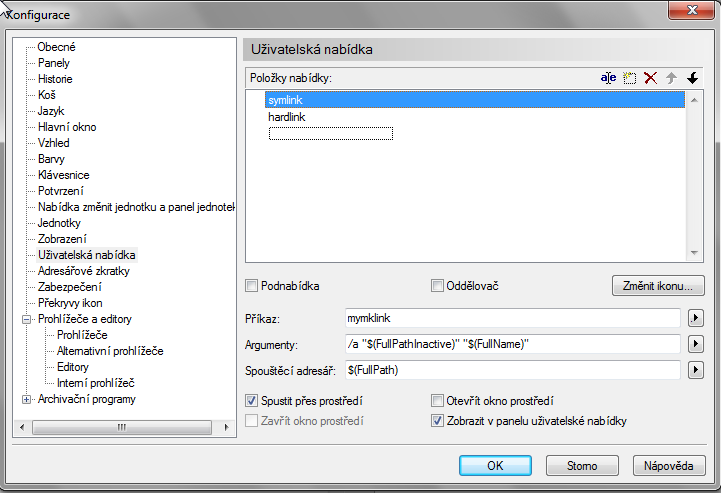
a takto pro hardlink.
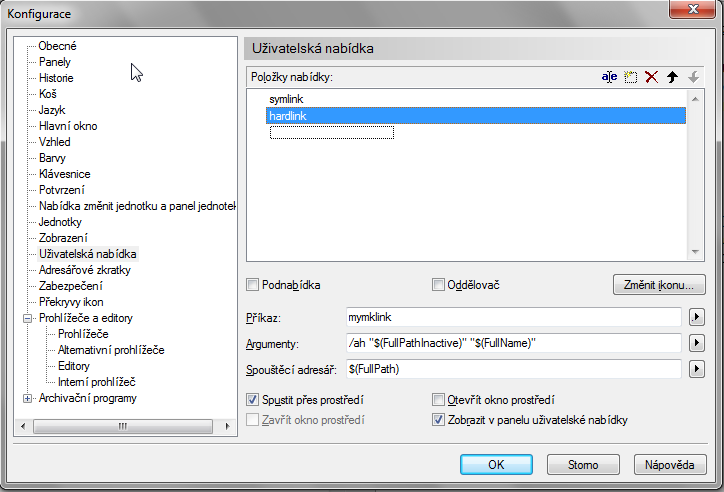
Pokud si soubor zkopírujete jinam, bude asi třeba zadat příslušný „Spouštěcí adresář“.
V Salámu to pak funguje asi takto: – pomocí F9 si vlezte do „Uživatelské nabídky“, a po vybrání položky vytvoří skript v adresáři otevřeném v neaktivním panelu odkaz na soubor(y)/adresář(e) vybraný(é) v aktivním panelu.
Před a po::
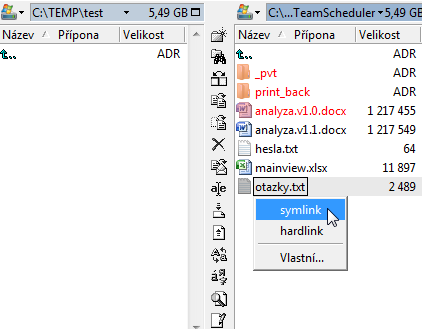
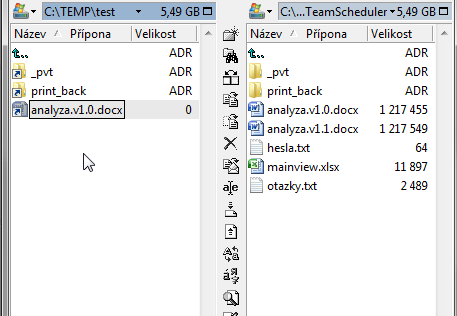
Jméno nového linku je automaticky nastaveno stené jako jméno původního souboru. Pokud byste preferovali možnost být pokaždé na jméno nového linku dotázáni, vynechte v definici na řádce „Argumenty“ parametr /a
A nyní již zdrojový kód tohoto veledíla:
<job>
<script language="VBScript">

  helpTxt = vbNewLine & vbNewLine & "Usage: mymklink [/H] [/A] [/V] linkDir target " & vbNewLine & " linkDir: directory where new link will be created " & vbNewLine & " target: path to the file/folder linked " & vbNewLine & " /H: hardlink is created instead of symlink " & vbNewLine & " /A: Auto - new link name will be automatically created from target - without it user is asked for new link name" & vbNewLine & " /V: Verbose - prints out mklink output even on success, by default only on errors "
  If WScript.Arguments.Count < 2 Then
    MsgBox helpTxt
    Wscript.Quit
  End If

  Set fso = CreateObject("Scripting.FileSystemObject")

  '// read required command line parameters
  linkDir = Trim(WScript.Arguments.Item(WScript.Arguments.Count-2))
  target = Trim(WScript.Arguments.Item(WScript.Arguments.Count-1))

  '// remove trailing backslash in linkDir & target if necessary
  If(Right(linkDir,1) = "\") Then
    linkDir = Left(linkDir,Len(linkDir)-1)
  End If
  If(Right(target,1) = "\") Then
    linkDir = Left(target,Len(target)-1)
  End If

  '// check first param
  If NOT fso.FolderExists(linkDir) Then
    MsgBox "Error: linkDir """ & linkDir & """ must be existing folder" & helpTxt
    Wscript.Quit
  End If

  '// check second param and find out if it is Folder or File
  If fso.FolderExists(target) Then
    isTargetFolder = 1
  Elseif fso.FileExists(target) Then
    isTargetFile = 1
  Else
    MsgBox "Error: target """ & target & """ must be existing folder/file" & helpTxt
    Wscript.Quit
  End If

  '// read optional command line parameters
  'target = Trim(WScript.Arguments.Item(WScript.Arguments.Count-1))
  extraOptions = ""
  For i = 0 to WScript.Arguments.Count-3
    extraOptions = extraOptions & Trim(WScript.Arguments.Item(i))
  Next
  extraOptions = UCase(extraOptions)
  extraOptionHard = InStr(extraOptions,"H")
  extraOptionAuto = InStr(extraOptions,"A")
  extraOptionVerbose = InStr(extraOptions,"V")
  'MsgBox "Options: H:"&extraOptionHard&" A:"&extraOptionAuto&" V:"&extraOptionVerbose '// DEBUG

  '// choose proper mklink command modifier depending on target type and hard/sym parameter
  If extraOptionHard Then
    If isTargetFolder Then
      modif = "/J "
    Else
      modif = "/H "
    End If
  Else
    If isTargetFolder Then
      modif = "/D "
    Else
      modif = ""
    End If
  End If

  '// default link name created from target file name
  linkName = fso.GetFileName(target)

  '// ask user for name of new link to be created
  '// if file/folder of specified name already exists user is informed and asked to give another name
  '// if auto parameter is specified user is not asked in first loop
  tmpErrMsg = ""
  Do
    If extraOptionAuto = 0 Then
      linkName = InputBox(tmpErrMsg & vbNewLine & "Enter the name for new link or press Cancel to end.", "Create Link", linkName)
      If linkName = "" Then
        Wscript.Quit
      End If
    End If

    link = linkDir & "\" & linkName

    If fso.FileExists(link) OR fso.FolderExists(link) Then
      tmpErrMsg = "Error: File or folder """ & link & """ already exists, choose another."
      link = ""
      extraOptionAuto = 0 '// We have to reset otherwise we will end-up with endless
    End If
  Loop While link = ""

  '// create mklink command
  'MsgBox "Parameters " & vbNewLine & "link: " & link & vbNewLine & "target: " & target '//DEBUG
  cmdMkLink = "mklink " & modif & """" & link & """ """ & target & """ "
  'MsgBox cmdMkLink '//DEBUG
  'Wscript.Quit '//DEBUG

  '// exec command and get mklink output
  Set oShell = WScript.CreateObject("WSCript.shell")
  Set oExec = oShell.Exec("cmd /K " & cmdMkLink & " & exit" )
  Do While oExec.Status = 0
     WScript.Sleep 100
  Loop
  res = oExec.StdOut.ReadAll
  errors = oExec.StdErr.ReadAll

  '// (if VERBOSE option is specified output is always printed, otherwise only on error)
  If oExec.ExitCode <> 0 Then
    MsgBox "Errors:" & vbNewLine & errors
  Else
    If extraOptionVerbose Then
      MsgBox res
    End If
  End If

</script>
</job>